

Test webhooks with the simulator
The webhook event simulator is a sandbox tool that publishes a scripted sequence of payment lifecycle events for a session you choose. Use it to exercise your webhook handler against every status transition - funded, FX completed, payout initiated, payout credited, completed, cancelled, bounced back.
The simulator runs only against the sandbox. Events flow through the same delivery pipeline as production webhooks, so payload shape and delivery order behave identically.
Prerequisites
Before you begin, make sure you have:
A registered webhook subscription
A PAYMENT STATUS subscription registered against your sandbox account. See the Webhooks overview for setup details.
A sandbox session
The simulator works with hosted sessions created via the Create Payment Session endpoint. Create one in the sandbox and use the returned session ID to drive the simulator.
The session reaches AWAITING_FUNDS once the user clicks Continue to Payment in the hosted session flow. This is the state from which a new scenario run begins.
You can also load a session that has already moved past AWAITING_FUNDS and continue it stage-by-stage in Manual mode — useful for resuming a flow after a browser reload or for inspecting a partially-driven session.
The simulator is available to anyone with sandbox credentials at simulator.sandbox.redpincompany.com. No additional access request is required.
How it works
You provide a session ID
The simulator looks up the session and surfaces the payment reference, recipients and the callback URL registered for PAYMENT STATUS events on the account that owns this session.
You pick an action and an execution mode
Each action is a predefined sequence of payment lifecycle events. Auto mode publishes the full sequence back-to-back from AWAITING_FUNDS. Manual mode publishes one stage per click, gated by the session’s current status, so you can verify your handler between stages.
Walkthrough
1. Open the simulator
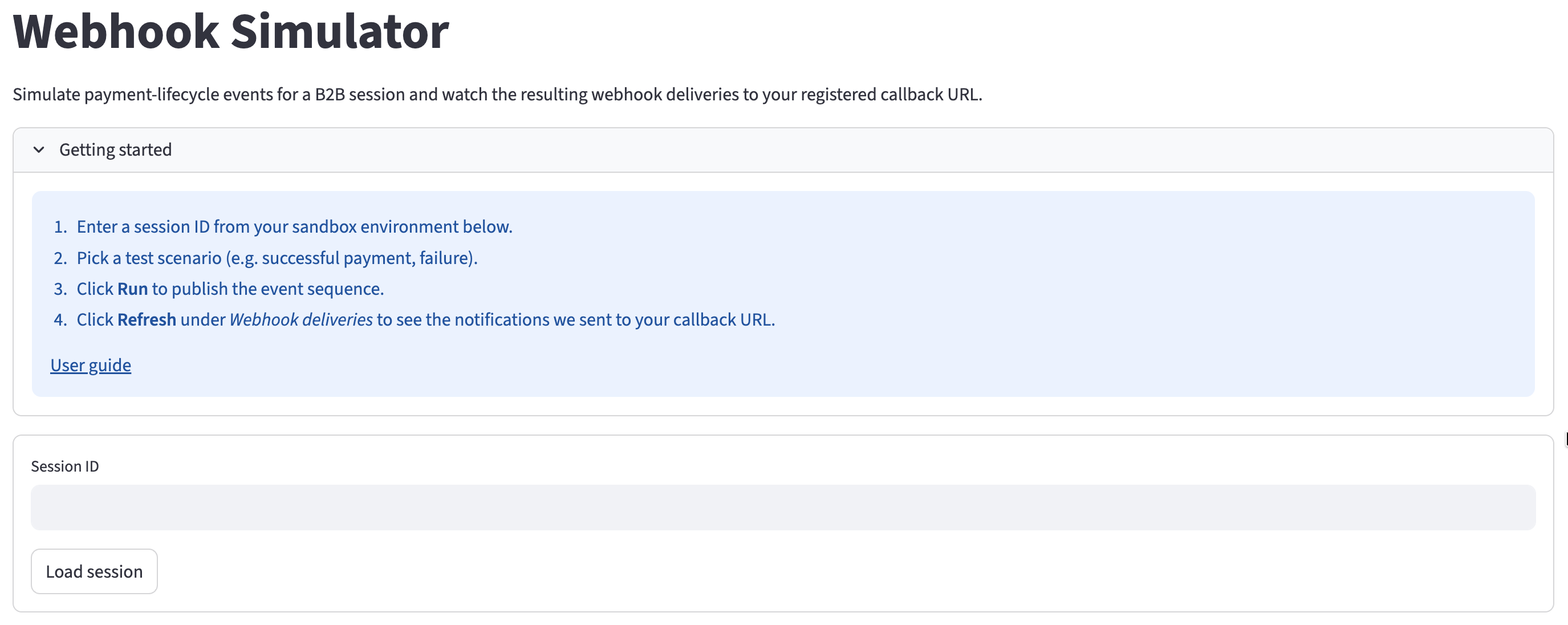
Navigate to simulator.sandbox.redpincompany.com. The Webhook Simulator page opens with a short Getting started panel and an empty Session ID field.
2. Load a session
If you do not have a session yet, create one with the Create Payment Session endpoint in the sandbox.
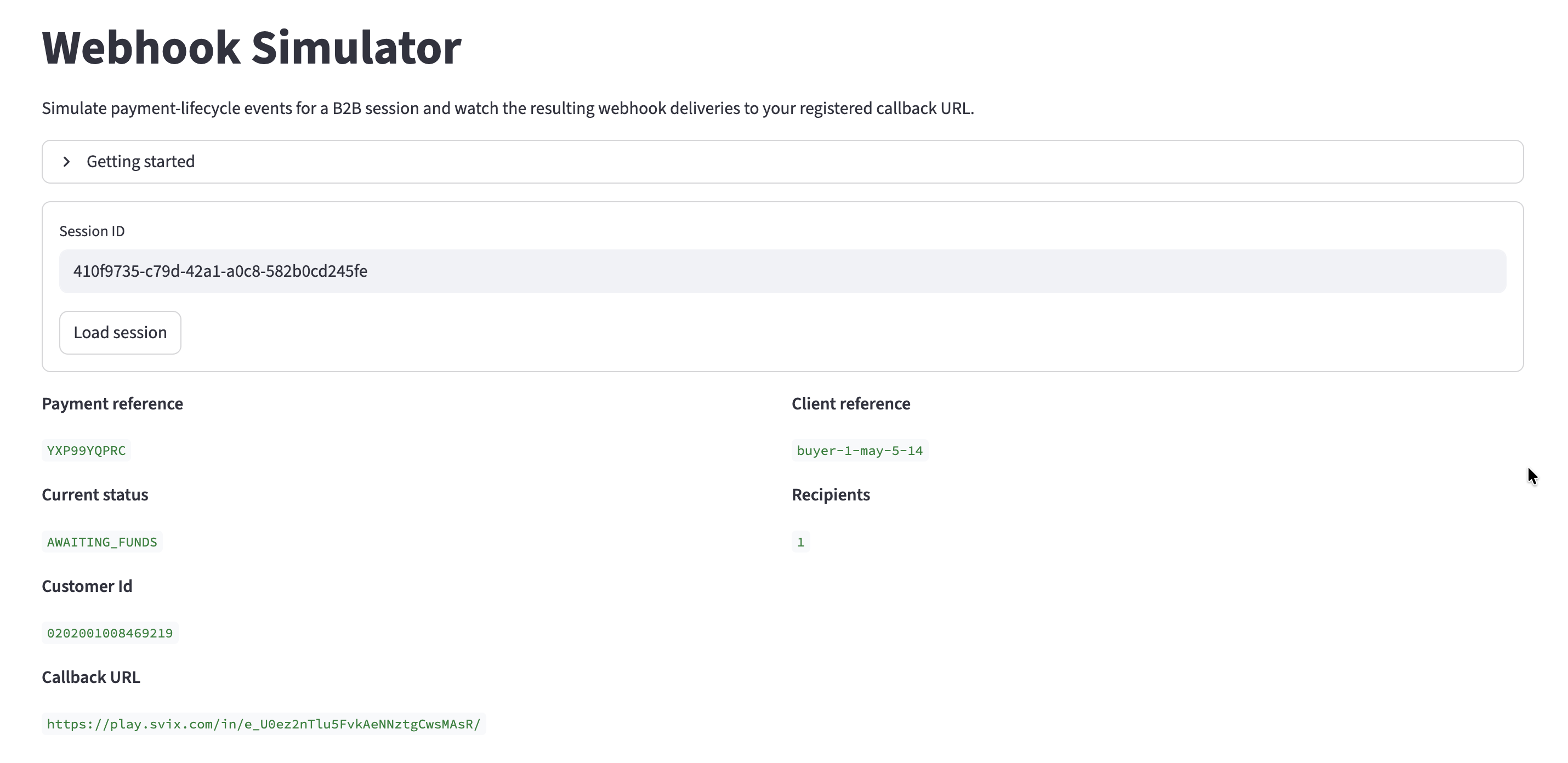
Paste a sandbox session ID into the Session ID field and click Load session. The simulator displays:
- Payment reference and Client reference for the session
- Current status of the payment
- Recipients count
- Customer identifier
- Callback URL registered to receive webhook events for this session
If Callback URL is empty, no PAYMENT STATUS subscription is registered for your account. Register a subscription using the Subscribe to Webhook endpoint before running an action.
3. Pick an action
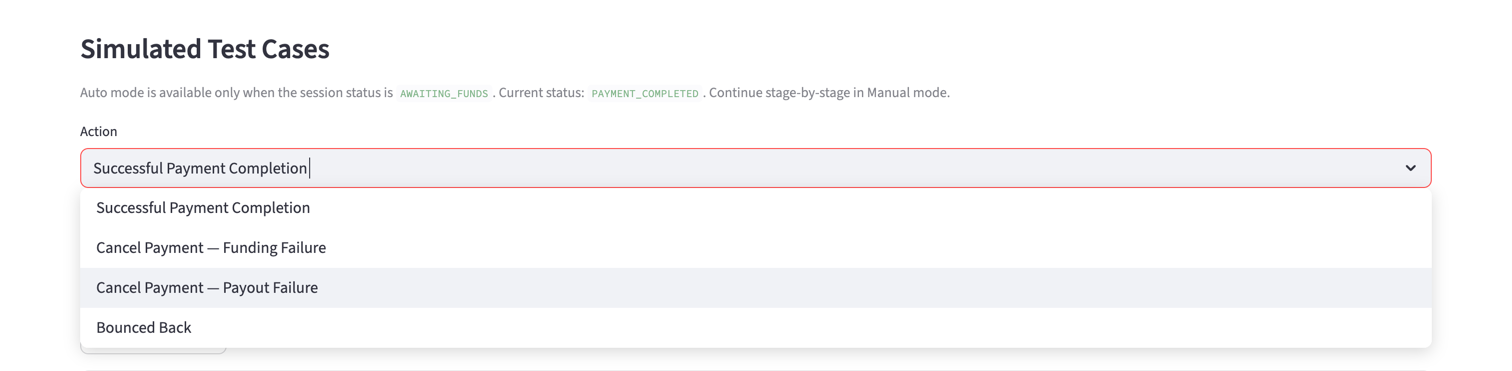
The Simulated Test Cases panel exposes the Action dropdown once a PAYMENT STATUS webhook subscription exists for the account that owns this session. If no subscription is registered, the panel shows an inline message pointing you to register one first.
Open the Action dropdown and choose the sequence you want to run. See Available actions below for what each one does.
4. Choose an execution mode
The Execution mode control selects how stages are published:
- Auto — publishes the full sequence back-to-back, waiting the configured delay between stages. Auto is available only when the session status is
AWAITING_FUNDS. Once the session has moved pastAWAITING_FUNDS, Auto is hidden and the panel falls back to Manual. - Manual — publishes one stage per click. Available at any session status. Each stage is gated by its
requires_status: the stage publishes only when the session’s current status matches the stage’s prerequisite. Manual mode lets you verify your handler between stages and resume a partially-driven session after a reload.
5. Run the sequence
Auto
Manual
Click Run. The simulator publishes each event in order, waiting the configured delay between stages. A progress indicator shows the current step and a table records each publish result.
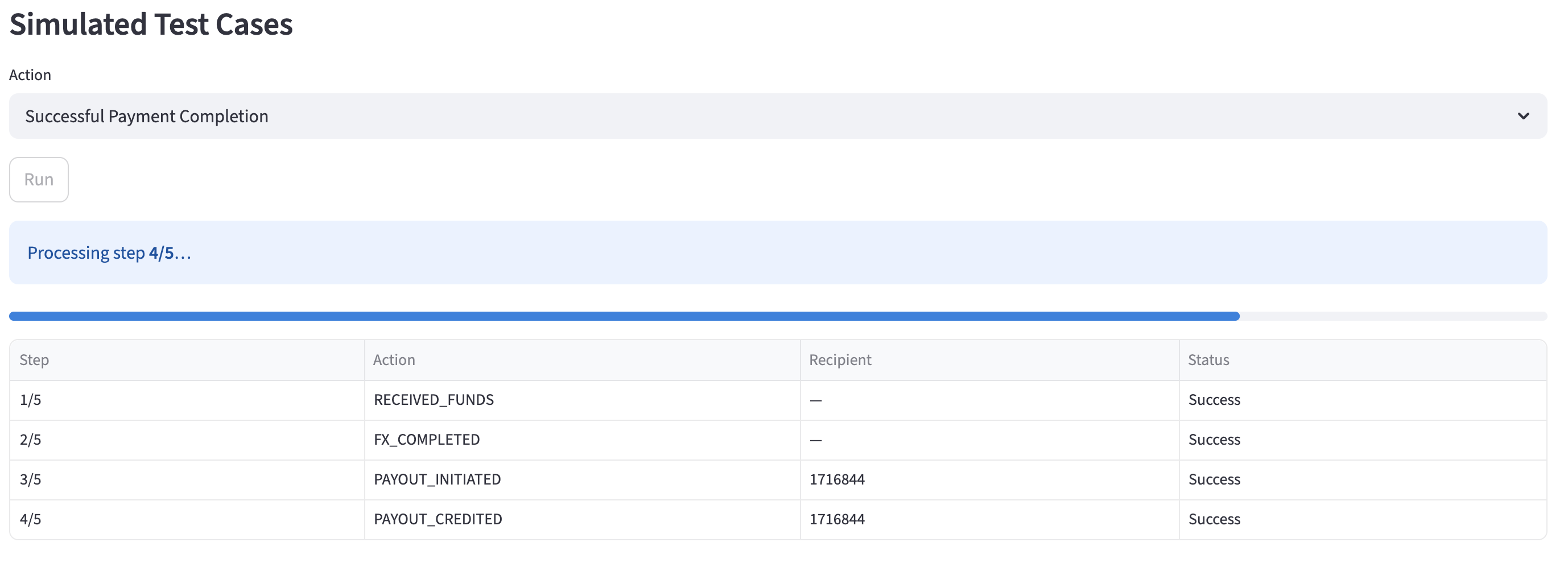
When the sequence finishes, you will see a success summary if every step published cleanly, or an error breakdown if any step failed.
6. Verify webhook deliveries
Scroll to the Webhook deliveries panel and click Refresh. The panel queries the delivery history for this session and lists every webhook delivered to your callback URL, including event type, status and the full payload.
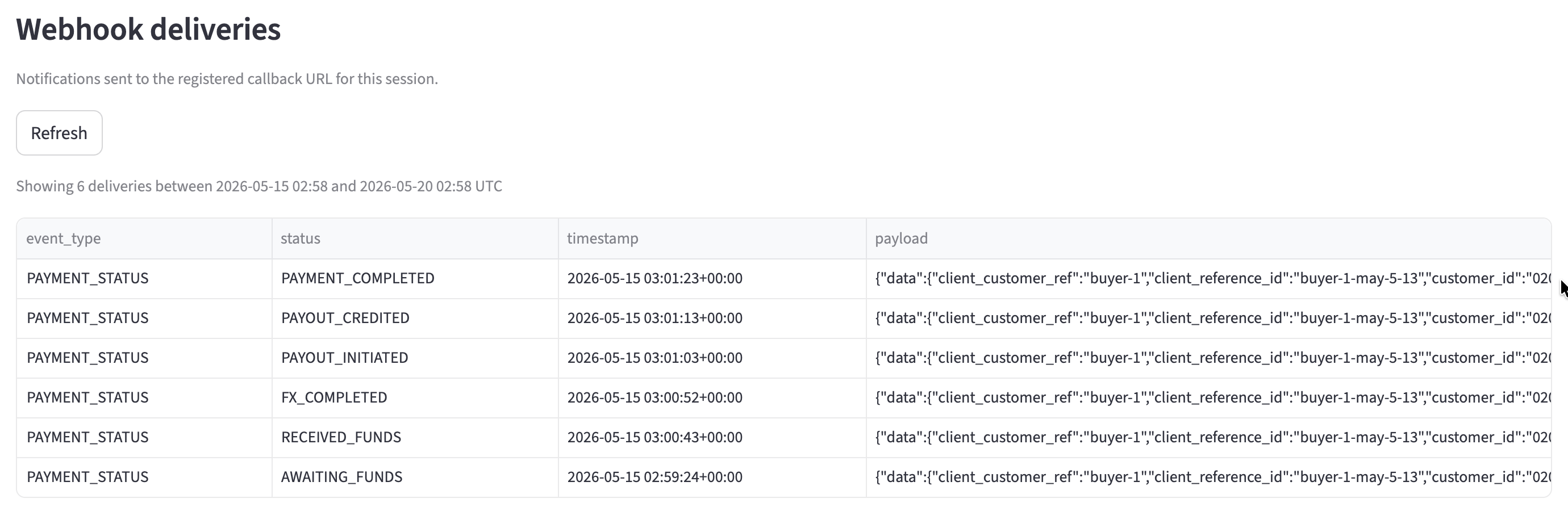
If your handler is correctly subscribed and reachable, every event in the sequence should appear here. Use the payloads to confirm your handler parsed each event correctly.
Available actions
This list reflects the actions available today. New actions are added periodically; check back if you do not see one you expect.
Successful Payment Completion
Simulates a payment that funds, converts, pays out to every recipient and settles successfully.
Steps marked per recipient publish one event for each recipient on the session. A session with three recipients produces three PAYOUT_INITIATED events and three PAYOUT_CREDITED events.
The Requires status column shows the session status each stage gates on. In Manual mode, a stage publishes only when the session’s current status matches its prerequisite. In Auto mode, the stages run back-to-back from AWAITING_FUNDS.
Use this action to verify your handler correctly transitions a payment through the full happy path.
Cancel Payment — Funding Failure
Simulates a payment that is funded and then cancelled before FX conversion (e.g., due to customer instruction or manual intervention).
Use this action to verify your handler correctly processes a cancellation after funds have been received but before payout initiation.
Cancel Payment — Payout Failure
Simulates a payment that completes FX, initiates payouts, and is then cancelled due to a downstream banking rejection/failure during the payout phase.
Use this action to verify your handler correctly processes a cancellation or rejection during the payout phase.
Bounced Back
Simulates a payment that completes successfully but where the recipient’s bank subsequently rejects and returns the funds (e.g., due to an invalid account number or closed account).
Use this action to verify your handler correctly processes a bounced back status and handles the returned funds.
For the exact payload shape of each event, see the Payment Status Updated Event in the Webhook Reference.
Troubleshooting
Session not found
The session ID does not exist in the sandbox. Verify the ID against the session you created and try again.
Action dropdown is not visible
The Simulated Test Cases panel hides the dropdown when no PAYMENT STATUS webhook subscription is registered for your account. Register one using the Subscribe to Webhook endpoint, then reload the session.
Auto mode is not offered, only Manual
Auto mode is available only when the session status is AWAITING_FUNDS. Once the session has moved past AWAITING_FUNDS, the panel offers Manual mode only — pick up stage-by-stage from where the session currently is, or load a fresh session at AWAITING_FUNDS to run Auto.
Manual mode button says 'Refresh status' and won't publish
The previous stage published successfully, but the session status has not yet moved forward to the next stage’s Requires status. Verify your handler completed processing the last event, then click Refresh status. When the status has advanced, the same click publishes the next stage.
Manual mode says no stages apply to this status
None of the stages in the chosen action have a Requires status matching the session’s current status. Pick a different action whose first applicable stage matches the current status, or load a session at an earlier state in the lifecycle.
Refresh returns no deliveries
The Webhook deliveries panel only shows deliveries from the point the session reached AWAITING_FUNDS. If the session has not progressed that far yet, run an action that includes RECEIVED_FUNDS first, wait for it to complete, then click Refresh.
If deliveries still do not appear after a completed run, check:
- Your callback URL is publicly reachable from the internet
- Your handler returns a
2xxstatus code within the response timeout
See the Webhooks overview for more on handler setup.
An action ran but my handler did not receive anything
Confirm the Callback URL displayed after loading the session matches the endpoint you are monitoring. If they match but your handler still received nothing, click Refresh in the Webhook deliveries panel to see the delivery history and any failure details.
Scope and limits
The simulator is built for integration verification, not load or performance testing.
- Sandbox only. No real funds move and no real bank instructions are sent.
- Same delivery pipeline as production. Payload shape and delivery order match what your handler will see in production.
- One session at a time. Each run targets a single session; load a different session ID to test another flow.